Evaluating the Password Tracker Log Book: Format, Utility, and KDP Interior Specifications
In an era dominated by digital security solutions, the analog Password Tracker Log Book remains a relevant tool for specific demographics and use cases. While password managers offer encryption and auto-fill capabilities, a physical log book provides an air-gapped backup that is immune to hacking, server outages, or subscription lapses. For individuals researching organizational tools or creators evaluating low-content book interiors for Amazon KDP, understanding the precise specifications and practical tradeoffs of this format is essential. The standard 6″ x 9″ trim size with 120 pages represents a balance between portability and capacity, but its utility depends entirely on how well the interior design aligns with user needs.
Distinguishing Features of the Standard 6x9 Format
The 6″ x 9″ dimension is the industry standard for personal organizers and reference books, distinguishing the Password Tracker Log Book from larger journals or smaller pocket notebooks. This size offers approximately 33% more writing surface area than a 5″ x 8″ notebook, which is critical when recording complex alphanumeric strings, security questions, and recovery emails. Conversely, it remains compact enough to fit in a desk drawer or handbag, unlike 8.5″ x 11″ formats that are often too cumbersome for sensitive personal data.
For those evaluating KDP interiors, the 120-page count is a strategic specification. It provides sufficient volume for hundreds of entries without making the spine too thin to print legibly or too thick to remain portable. A 120-page book at this trim size typically results in a spine width of approximately 0.3 inches, allowing for clear titling while maintaining a slim profile. When assessing these interiors, verify that the page count aligns with the "No Bleed" setting. No Bleed means all content must stay within the safe margin, typically 0.375 inches from the edge, ensuring that no text is trimmed during the binding process. This is distinct from full-bleed designs where graphics extend to the paper's edge, a feature rarely necessary for functional log books but common in decorative journals.
Technical Quality and File Specifications
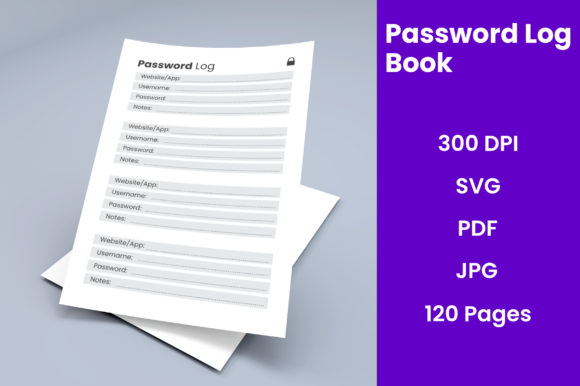
Whether purchasing a finished product or sourcing files for publication, technical resolution dictates usability. High-quality Password Tracker Log Book interiors should be rendered at 300 DPI (dots per inch). At lower resolutions, fine lines in table grids or small fonts for column headers may appear pixelated or fuzzy when printed, reducing the professional appearance and legibility of the entry fields.
When comparing source file options, the availability of multiple formats serves different user needs:
- Print-Ready PDF: This is the non-negotiable deliverable for immediate publishing or printing. It locks in formatting, fonts, and margins. Users should ensure the PDF is flattened to prevent layer shifting.
- SVG Files: Scalable Vector Graphics are essential for customization. Unlike raster images, SVGs allow users to resize tables, adjust column widths, or change header fonts without losing quality. This is vital for adapting a generic template to niche requirements, such as adding columns for "2FA Method" or "Recovery Contact."
- JPG Files: Useful primarily for cover design mockups or marketing materials rather than the interior content itself. Raster formats like JPG are generally unsuitable for text-heavy log book pages due to compression artifacts.
- afPUB Files: Affinity Publisher source files represent a middle ground between proprietary Adobe InDesign files and open vectors. They allow for comprehensive layout editing for users who own the software, offering more control than SVGs but requiring specific applications.
Analog vs. Digital: Assessing the Tradeoffs
Choosing a Password Tracker Log Book over a digital alternative involves accepting specific limitations in exchange for distinct benefits. Understanding these tradeoffs helps determine if this format is the right solution or if a hybrid approach is necessary.
Security and Accessibility Comparisons
Digital password managers excel at convenience and synchronization. They generate strong passwords and autofill credentials across devices. However, they introduce a single point of failure; if the master password is lost or the service experiences a breach, access to all accounts is compromised. The Password Tracker Log Book eliminates cyber risk entirely. It cannot be hacked remotely. For users prioritizing disaster recovery or long-term archival of legacy account information, the physical book serves as an ultimate fallback.
However, the analog format lacks search functionality and portability across locations. Users cannot query a physical book for "Netflix" while standing in line at a grocery store. Therefore, the log book is best evaluated not as a replacement for daily digital tools, but as a complementary master record kept in a secure home location. Readers comparing options should consider whether their primary need is daily convenience (favoring digital) or secure, long-term estate planning and backup (favoring analog).
Usability and Layout Considerations
Not all Password Tracker Log Book interiors are created equal. When comparing products or templates, evaluate the column structure against modern authentication realities. Older templates may only include fields for "Website," "Username," and "Password." Modern iterations should account for two-factor authentication methods, recovery email addresses, PIN codes, and notes sections for security questions. A rigid layout that lacks a "Notes" field significantly reduces the book's longevity, as users will quickly run out of space for contextual information that doesn't fit standard categories.
Furthermore, paper quality and opacity matter more in a password log than in a standard journal. Because users often write on both sides of the page, bleed-through can render previous entries illegible or compromise privacy. While KDP standard paper is acceptable, users comparing premium options should look for specifications indicating higher GSM or cream paper, which reduces show-through compared to bright white paper.
Decision Factors for Creators and Publishers
For authors and designers creating KDP interiors, the decision to produce a Password Tracker Log Book requires market awareness beyond basic specifications. The market is saturated with generic templates, so differentiation relies on thoughtful design and adherence to technical best practices.
Niche Adaptation vs. Generic Utility
A generic 120-page password log competes in a high-volume, low-margin category. Successful alternatives often adapt the core specifications to specific audiences. For example, a "Senior Citizen Internet Safety Log" might utilize larger font sizes, wider spacing, and simplified columns, deviating from the standard dense grid. A "Crypto Asset Tracker" would require entirely different fields, such as wallet addresses, seed phrase storage warnings, and exchange names. When evaluating source files like SVG or afPUB, prioritize those that allow structural modification over those that merely offer aesthetic color changes. The ability to alter the fundamental grid system is what enables viable niche adaptation.
Evaluating Source File Integrity
When acquiring or reviewing interiors, verify that the "No Bleed" margins are correctly applied throughout the entire 120-page document. A common error in low-quality templates is inconsistent gutter margins. In a 6″ x 9″ bound book, the inner margin (gutter) must be wider than the outer margin to accommodate the binding curve. If a template uses symmetrical margins, text near the spine will be difficult to read or write in. Professional-grade source files will have mirrored margins set specifically for the 120-page thickness. Always request or generate a test print before committing to a full publication run to validate that the writing space is physically accessible.
When to Choose Alternative Solutions
Despite the tangible benefits of a Password Tracker Log Book, it is not universally appropriate. Recognizing when this format fails prevents frustration and wasted resources.
High-Frequency Access Needs: Individuals who manage dozens of active accounts daily and require cross-device access will find a physical log book inefficient. The friction of manually transcribing credentials outweighs the security benefits for active users. In this scenario, a hardware security key combined with a reputable password manager is superior.
Collaborative Environments: Families or business teams sharing account access cannot effectively use a single physical log book without creating bottlenecks or security risks through physical hand-offs. Shared digital vaults with permission controls are the appropriate solution here.
Dynamic Credential Management: Users who frequently rotate passwords or manage temporary access tokens will exhaust a 120-page book rapidly and create a chaotic record. Physical logs are best suited for stable, long-term credentials rather than ephemeral security data.
Making an Informed Selection
The value of a Password Tracker Log Book lies in its specificity. For end-users, it offers a tactile, unhackable repository for critical account information, provided the layout accommodates modern security fields and the physical size supports comfortable handwriting. For creators, the 6″ x 9″, 120-page, No Bleed specification serves as a reliable foundation, but success depends on leveraging editable source files (SVG, afPUB) to create differentiated, user-centric layouts rather than replicating generic grids.
Ultimately, the decision should be driven by the specific problem being solved. If the goal is offline redundancy and estate organization, the analog format excels. If the goal is daily workflow efficiency, digital tools remain superior. By carefully evaluating technical specifications alongside practical use cases, both consumers and publishers can determine whether this traditional tool merits a place in their modern security ecosystem.